
A server rack cabinet is a standardised 19-inch metal enclosure that houses networking, computing, storage and power equipment in stacked “U” slots. Picture it as a multi-storey apartment block for a server room: the cabinet is the building, and every device is a tenant living on its own floor. This illustrated guide explains what sits inside a typical cabinet, why each part is placed where it is, and how power and data flow through it — useful for engineers, panel builders, integrators and buyers across the Middle East and Gulf (including Egypt and Saudi Arabia), North Africa, the CIS and Sub-Saharan Africa who specify and source rack power and distribution equipment.
One term first. U (rack unit) is the cabinet’s “floor”: 1U = 4.45 cm of height. Devices are always described in these units — a “1U switch”, a “2U server”. The most common cabinet size is 42U (roughly 2 metres tall), and the mounting width is a worldwide standard 19 inches. That single standard is why any manufacturer’s equipment fits into any manufacturer’s cabinet.
The anatomy of a rack cabinet
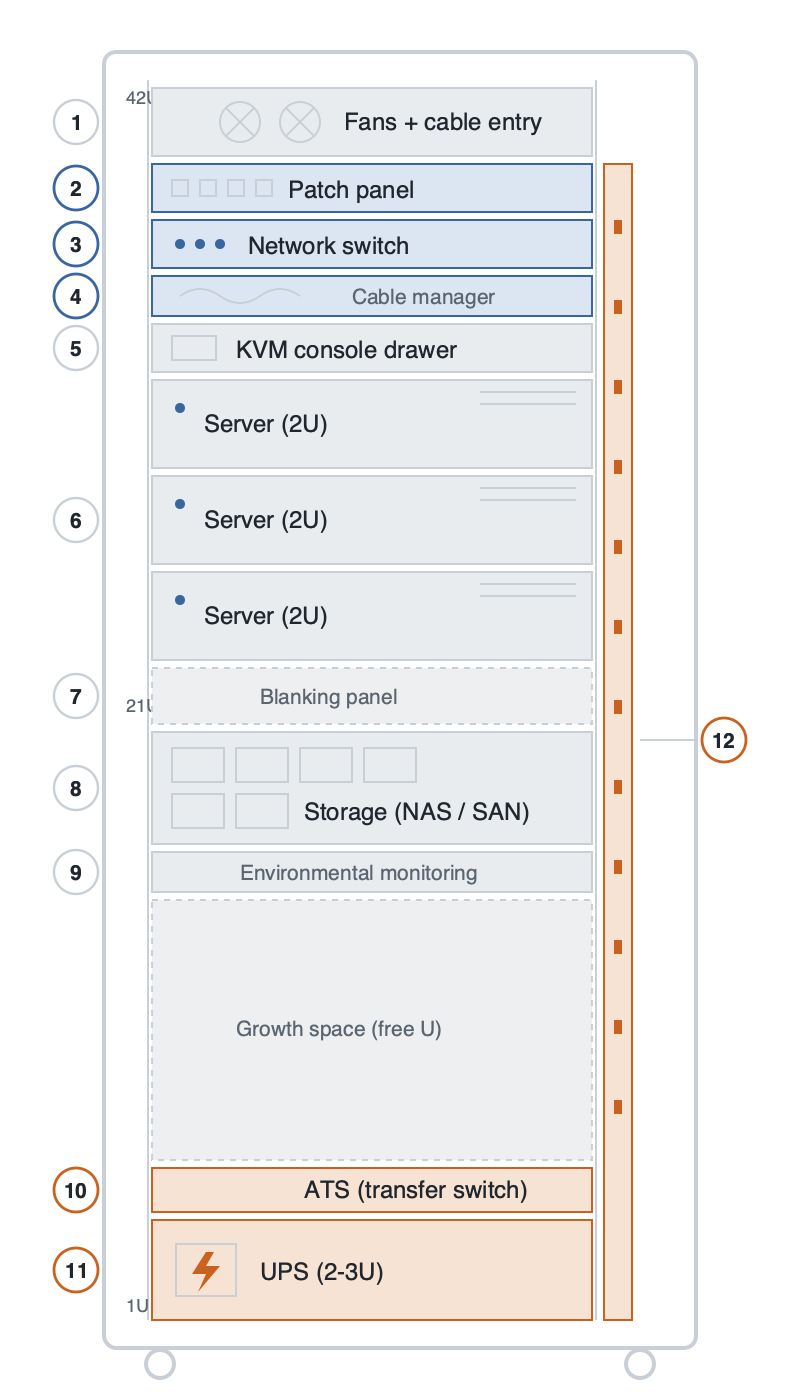
The placement is not random. Hot air rises, so cooling and cable entry sit at the top; the heaviest items (batteries) go to the bottom so the cabinet cannot tip. Reading the rack from top to bottom:
| # | Component | Typical size / place | What it does |
|---|---|---|---|
| 1 | Fans + cable entry | Top | Fans exhaust the hot air that rises off the equipment; cables enter the cabinet here. |
| 2 | Patch panel | 1U | The tidy row of ports where dozens of incoming network cables terminate — like a fuse box, but for data. Cables land here first so a single change does not mean unplugging everything. |
| 3 | Network switch | 1U | The cabinet’s post office: it connects every server to the others and to the internet, and decides which data goes where. Placed just below the patch panel to keep the links short. |
| 4 | Cable manager | 1U | The “comb” that combs and lays down the cable clutter. Good cable order is often what separates a well-built cabinet from a bad one — messy cabling blocks airflow and makes fault-finding a nightmare. |
| 5 | KVM console drawer | 1U | A pull-out drawer with a fold-away screen and keyboard (KVM = Keyboard, Video, Mouse). One technician can reach every server without a separate monitor per machine. |
| 6 | Servers | 1U / 2U | The real tenants — the computers that do the work (websites, databases, camera recording). Flat “pizza-box” units that slide out on rails; front LEDs show run/fault status. |
| 7 | Blanking panels | Filler | Flat covers over unused slots. Not decoration: cold air is drawn in at the front and hot air pushed out the back, and open gaps let hot air short-circuit back to the front. Blanking panels stop that. |
| 8 | Storage (NAS / SAN) | 2U – 4U | The archive room: a unit holding dozens of disks where the data actually lives. Servers do the computing; storage keeps the data. Faulty disks are hot-swapped without shutting the system down. |
| 9 | Environmental monitoring | 1U / 0U | The cabinet’s thermometer and alarm: it watches temperature, humidity, door opening and water leaks, and messages the operator when something is wrong. |
| 10 | ATS — automatic transfer switch | 1U | An automatic switch that changes between two power sources within seconds. If the mains fails, the ATS transfers to the second source (generator or second feed) by itself — nobody swaps plugs by hand. |
| 11 | UPS — uninterruptible power supply | 2U – 3U, bottom | A battery-backed unit that takes over the instant power is lost and keeps the cabinet alive until the generator starts or the system shuts down cleanly. Batteries are heavy, so the UPS always sits at the bottom. |
| 12 | PDU — power distribution unit | 0U, vertical at the rear | The cabinet’s intelligent power strip: it takes power from the UPS and distributes it to every device. Smart models meter each outlet and can be switched remotely. Mounted vertically at the rear so it uses no U-space. |
How power travels through the cabinet
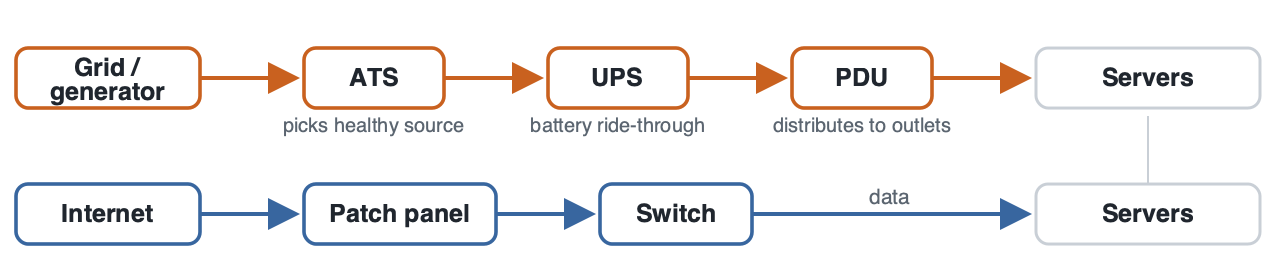
Electrical continuity is the whole point of a well-designed cabinet. Utility power (and, where present, a generator) feeds the ATS, which always selects the healthy source. From there the supply passes through the UPS, which rides through short interruptions on battery, and then to the PDU, which distributes conditioned power to every device. This is exactly the kind of resilient distribution and medium-voltage switchgear thinking used upstream in substations — only scaled down to a single cabinet. The same discipline of source selection, backup and protection applies whether the equipment is a rack ATS or a feeder protection relay.
Details worth knowing
- The doors are perforated. Front and rear doors are honeycomb-perforated so cold air enters at the front and hot air leaves at the back. Elegant glass doors are a poor choice for a server cabinet — they trap heat.
- Heavy at the bottom. UPS and batteries go lowest, light networking gear on top. Cabinets sit on castors or adjustable feet and, in seismic regions, are bolted to the floor.
- Two of everything. In serious installations the power chain is doubled: two PDUs, dual power supplies in the servers, two independent feeds. The goal is that a single failed part never stops the system — which is why PDUs and UPS units are usually sold in pairs.
- Grounding and labelling. The metal body is earthed, and in a proper build every cable is labelled at both ends. The fastest way to judge a cabinet’s quality is to open the rear door and look at the cabling.
Frequently asked questions
What does “U” mean in a rack cabinet?
U stands for “rack unit” and equals 4.45 cm of vertical space. A 42U cabinet has 42 of these mounting positions, so a 2U server occupies two of them.
Why is the UPS always at the bottom of the rack?
UPS units contain heavy batteries. Placing the heaviest item at the bottom keeps the cabinet’s centre of gravity low so it cannot tip, especially when servers are slid out on their rails.
What is the difference between an ATS and a UPS?
An ATS switches between two power sources (for example mains and generator) within seconds, while a UPS bridges the gap on battery during the switch-over and conditions the supply. They work together: the ATS chooses the source, the UPS covers the moment of transfer.
What is the difference between a PDU and a normal power strip?
A basic PDU resembles a multi-outlet extension lead, but managed PDUs meter the current on each outlet, report it remotely and can switch individual outlets on or off — essential for monitoring load and cycling equipment without a site visit.
Why are blanking panels important?
They close unused slots so hot exhaust air cannot loop back to the cold intake. Without them, cooling efficiency drops and equipment runs hotter than it should.
Are rack cabinets a standard size?
The 19-inch mounting width is a global standard, which is why equipment from any manufacturer fits any cabinet. Height varies, with 42U being the most common, and depth is chosen to suit the equipment.
Looking for medium voltage switchgear and power distribution equipment?
Looking for high-quality medium voltage switchgear and power distribution equipment? We provide expert engineering support and reliable products for all your medium voltage needs.
For quotations and requests: info@electricistanbul.com
WhatsApp: +90 501 076 69 91